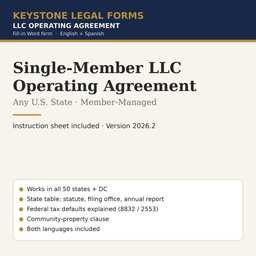
Single-Member LLC Operating Agreement Template — Any State
One owner. Key Terms table + 7 articles, the tax-classification choices explained. 51 state editions included, each with its state's statute, filings and clauses already in place.
The first pages
Rendered from the actual form. Yellow fields are the ones you fill in; the rest is already written.
OPERATING AGREEMENT
[COMPANY NAME], LLC
The information in this table is incorporated into the Agreement that follows. Where the Agreement refers to an item "in the Key Terms," it means the entry below.
| Item | Entry |
|---|---|
| Company name | [COMPANY NAME], LLC |
| State of organization | [STATE] |
| Formation document and filing office | [FORMATION DOCUMENT: "Articles of Organization" OR "Certificate of Formation" OR "Certificate of Organization"], filed with the [FILING OFFICE] on [FILING DATE] |
| Effective date of this Agreement | [EFFECTIVE DATE] |
| Principal office | [PRINCIPAL OFFICE ADDRESS] |
| Registered office | [REGISTERED OFFICE ADDRESS] |
| Registered agent — name and address | [REGISTERED AGENT NAME] · [REGISTERED AGENT ADDRESS] |
| Member — name and mailing address | [MEMBER NAME] · [MEMBER MAILING ADDRESS] |
| Member's initial capital contribution | $[INITIAL CONTRIBUTION AMOUNT] in cash · Non-cash contribution and agreed value: [DESCRIPTION OF NON-CASH CONTRIBUTION, OR "None"] |
| Management | Member-managed. The Member manages the Company directly. |
| Officers (optional) | President: [OFFICER NAME, OR "None"] · Secretary: [OFFICER NAME, OR "None"] · Treasurer: [OFFICER NAME, OR "None"] |
| Intended U.S. federal tax classification (state taxes follow unless elected otherwise) | [FEDERAL TAX CLASSIFICATION] |
| Fiscal year | Calendar year |
… the document continues for about 5 pages.
The instruction sheet
Every download includes a plain-language instruction sheet. This is how it opens.
INSTRUCTION SHEET
Single-Member LLC Operating Agreement
This is the operating agreement for a limited liability company organized in any U.S. state or the District of Columbia that has one owner who will run the business personally. The owner is called the "Member". The agreement records that the Member owns 100% of the company, that the Member manages it, how profits are paid out, what happens if the Member dies or sells, and the rules that protect the Member's limited liability.
How a state-neutral form works. Every state has its own LLC statute, but the statutes agree on the points that matter for a single-owner company: the owner is not liable for the company's debts; the owner may manage the company; distributions cannot be made if they would leave the company insolvent; and the operating agreement governs everything else. This form refers to the state's statute as "the Act" and states the rules in words rather than by section number, so that it is correct in every state. You tell the form which state by completing [STATE] and [STATE LLC ACT]; the table in these instructions gives you the statute name for each state.
Why a single-owner company needs this document. A few states require a written operating agreement by statute. In every state, banks, landlords, tax auditors and courts expect one. It is the document that shows the company is a separate entity from its owner — the whole reason for forming an LLC — and it tells a bank officer who is authorized to sign.
Use this form if: one person (or one company) owns the LLC; that person will make all decisions personally; and there is no present plan to bring in partners.
Use a different form if: there is more than one owner (use the multi-member form, US-LLC-02); the company is organized in Puerto Rico (use the PR-LLC series, which cites the Puerto Rico statute); or the company will render licensed professional services.
• Work in Microsoft Word (or any program that opens .docx files). Every field appears in yellow highlight inside square brackets, for example [COMPANY NAME]. Replace the whole bracket — including the brackets themselves — with your information, and remove the yellow highlight (select the text, then Home → Text Highlight Color → No Color).
• Some fields offer choices, written as "OPTION A" OR "OPTION B". Pick one, type that text in place of the entire bracket, and delete the alternatives. Never leave both options in the signed document.
• Use the search function (Ctrl+F) to search for an opening square bracket when you are done. If the search finds nothing, every field has been completed.
State editions
All 51 editions are in the same download. Open a state to see what its edition already fills in.
AL · AK · AZ · AR · CA · CO · CT · DE · DC · FL · GA · HI · ID · IL · IN · IA · KS · KY · LA · ME · MD · MA · MI · MN · MS · MO · MT · NE · NV · NH · NJ · NM · NY · NC · ND · OH · OK · OR · PA · RI · SC · SD · TN · TX · UT · VT · VA · WA · WV · WI · WY
Questions
What file do I get?
A zip with the state-neutral form and all 51 state editions as Word (.docx) files in English and Spanish, plus the Instruction Sheet. Open in Microsoft Word, Google Docs or LibreOffice.
How do I complete it?
Open the Instruction Sheet first. Replace each yellow [BRACKETED FIELD] with your information, delete the options you do not use, delete the cover page, then print or e-sign.
Can I reuse it?
Yes. The license covers your own business and every company you own; it does not allow resale of the template itself.
Do I need a notary or a lawyer?
The Instruction Sheet says when a signature needs a notary and lists the situations where the form is not enough and an attorney should review it.
Refunds?
Digital downloads are final once delivered. The preview on this page is taken from the actual document so you can see what you are buying.