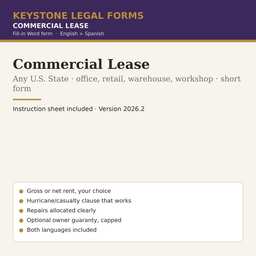
Commercial Lease Agreement Template — Any State
Office, retail, warehouse or workshop. Gross or net rent, casualty, repairs, eviction, memorandum of lease, optional guaranty. 51 state editions included.
Who it is for
A landlord and a business tenant leasing an office, store, warehouse or workshop for one to several years — balanced enough that either side can propose it.
What is inside
- Commercial Lease: Key Terms table (premises, use, term, renewal, rent and increases, operating expenses, utilities, deposit, free-rent period, insurance, guaranty) + 10 articles — premises and term, use, rent and charges, maintenance and alterations, insurance and liability, casualty and condemnation, assignment, default and remedies, end of lease, general
- Schedule 1 Condition of the Premises · Schedule 2 Building Rules · Guaranty of Lease (optional)
- Instruction Sheet: gross vs net rent, who repairs what, casualties, assignment and change of control, default and eviction, subordination, the guaranty, after-signing checklist, when the form is not enough
The first pages
Rendered from the actual form. Yellow fields are the ones you fill in; the rest is already written.
COMMERCIAL LEASE
The information in this table is incorporated into the Lease that follows. Where the Lease refers to an item "in the Key Terms," it means the entry below.
| Item | Entry |
|---|---|
| Landlord — name, entity type and address | [LANDLORD NAME] · [LANDLORD ENTITY TYPE AND ADDRESS] |
| Tenant — name, entity type and address | [TENANT NAME] · [TENANT ENTITY TYPE AND ADDRESS] |
| Premises | [PREMISES DESCRIPTION — e.g., "Suite 201, approximately 1,200 square feet, in the building known as" AND THE BUILDING NAME AND ADDRESS], together with [PARKING SPACES AND COMMON AREAS, OR "no parking spaces"] |
| Tax parcel number of the property | [TAX PARCEL NUMBER] |
| Permitted use | [PERMITTED USE — e.g., "general office use for an accounting practice"] and no other use |
| Term | [TERM IN MONTHS OR YEARS], beginning on the Commencement Date and ending on the Expiration Date |
| Commencement Date | [COMMENCEMENT DATE] |
| Expiration Date | [EXPIRATION DATE] |
| Renewal option | [TYPE "None" OR "One option to renew for" AND THE PERIOD "on" AND THE DAYS "days' written notice before the Expiration Date, at the rent in Section 3.3"] |
| Base Rent | $[MONTHLY BASE RENT] per month, payable in advance on the first day of each month |
| Rent increases | [TYPE "None" OR "Base Rent increases by" AND THE PERCENTAGE "% on each anniversary of the Commencement Date"] |
| Additional charges paid by Tenant | [TYPE "None — the Base Rent is a gross rent" OR "Tenant's" AND THE PERCENTAGE "% share of the Operating Expenses described in Section 3.4, estimated at $" AND THE AMOUNT "per month"] |
| Utilities | Tenant pays directly for [UTILITIES PAID BY TENANT — e.g., "electricity, water, internet"]; Landlord pays for [UTILITIES PAID BY LANDLORD, OR "none"] |
| Security deposit | $[SECURITY DEPOSIT AMOUNT] |
| Rent-free or build-out period | [TYPE "None" OR THE NUMBER OF DAYS "days from the Commencement Date, during which no Base Rent is due"] |
| Tenant's insurance | Commercial general liability of at least $[LIABILITY INSURANCE AMOUNT] per occurrence, naming Landlord as additional insured, plus property insurance on Tenant's contents |
| Guaranty | [TYPE "None" OR "Personal guaranty of" AND THE GUARANTOR'S NAME "attached"] |
| Governing law and courts | State of [GOVERNING LAW STATE] (the state where the Premises are located); state courts located in [COUNTY AND STATE FOR LAWSUITS] |
… the document continues for about 9 pages.
The instruction sheet
Every download includes a plain-language instruction sheet. This is how it opens.
INSTRUCTION SHEET
Commercial Lease
This is a lease of commercial space — an office, a store, a warehouse, a workshop — between a landlord and a business tenant, for a term of one to several years. It is a "short form" in the sense that it fits on a dozen pages and is written in plain language, but it covers everything a commercial lease must: the premises and the term, the permitted use, rent and increases, the tenant's share of building expenses (if any), utilities, the security deposit, who repairs what, alterations, insurance and indemnity, what happens after a fire, storm or other casualty, assignment and subletting, default and the landlord's remedies, and the condition in which the premises are returned. It includes two schedules (the condition of the premises and the building rules) and an optional guaranty by the tenant's owner.
The form is balanced. It gives the landlord the protections it needs (deposit, late charges, suspension of abatement for tenant-caused damage, summary eviction) and the tenant the protections it needs (quiet enjoyment, rent abatement when the premises are unusable, a cap on operating-expense surprises, a non-disturbance condition on subordination, and a reasonable-consent standard for assignment and alterations). Either side can use it.
Use this form if: the premises are commercial, the tenant is a business, and the arrangement is a straightforward lease of space for rent.
Use a different form if: the premises are a dwelling (residential leases are governed by different rules); the lease is of land for development, or includes a purchase option, a ground lease or a build-to-suit; or the space is in a large shopping center or office tower whose owner uses its own long-form lease — in which case this form is the tenant's checklist of what a fair lease contains.
• Work in Microsoft Word (or any program that opens .docx files). Every field appears in yellow highlight inside square brackets, for example [TENANT NAME]. Replace the whole bracket — including the brackets themselves — with your information, and remove the yellow highlight (select the text, then Home → Text Highlight Color → No Color).
• Some fields offer choices, written as "OPTION A" OR "OPTION B", or begin with the word TYPE followed by the alternatives. Pick one, type that text in place of the entire bracket, and delete the alternatives.
• Complete the Key Terms first; the Lease refers to them. Then Schedules 1 and 2, then the Guaranty if the Key Terms call for one (otherwise delete that page). Delete the cover page before signing.
• Use the search function (Ctrl+F) to search for an opening square bracket when you are done. Dates: write them in full ("March 3, 2026").
State editions
All 51 editions are in the same download. Open a state to see what its edition already fills in.
AL · AK · AZ · AR · CA · CO · CT · DE · DC · FL · GA · HI · ID · IL · IN · IA · KS · KY · LA · ME · MD · MA · MI · MN · MS · MO · MT · NE · NV · NH · NJ · NM · NY · NC · ND · OH · OK · OR · PA · RI · SC · SD · TN · TX · UT · VT · VA · WA · WV · WI · WY
Questions
What file do I get?
A zip with the state-neutral form and all 51 state editions as Word (.docx) files in English and Spanish, plus the Instruction Sheet. Open in Microsoft Word, Google Docs or LibreOffice.
How do I complete it?
Open the Instruction Sheet first. Replace each yellow [BRACKETED FIELD] with your information, delete the options you do not use, delete the cover page, then print or e-sign.
Can I reuse it?
Yes. The license covers your own business and every company you own; it does not allow resale of the template itself.
Do I need a notary or a lawyer?
The Instruction Sheet says when a signature needs a notary and lists the situations where the form is not enough and an attorney should review it.
Refunds?
Digital downloads are final once delivered. The preview on this page is taken from the actual document so you can see what you are buying.